What exactly is an SSL certificate?
Imagine someone visits your website.
Without SSL, their connection runs "openly" through the internet. With SSL (or more accurately, TLS), the connection becomes HTTPS, meaning it is:
- encrypted -> so no one can read it.
- authenticated -> the browser knows it is communicating with your server.
- integrity-protected -> data cannot be changed en route.
The little padlock in the browser's URL bar provides more information about the encrypted connection and the SSL certificate.
For this to work, the server must have an SSL certificate issued by a trusted certification authority (CA). This certificate confirms the following:
"This server really belongs to this domain."
Important: An SSL certificate always has a limited validity period and must be renewed regularly.
Background - What has changed?
Previously, the situation was as follows:
A publicly trusted SSL certificate could be valid for up to 13 months (398 days). This was the standard for a long time. However, browser manufacturers and certification authorities have agreed to gradually and drastically shorten this period.
Why, and what are the advantages?
-
If a certificate is compromised, it can only be misused for a shorter period of time.
-
Security standards and cryptography can be updated more quickly.
The planned development is as follows:
| Period of time | Maximum validity |
|---|---|
| Today | ~ 398 days |
| From March 2026 | 200 days |
| From 2027 | 100 days |
| From 2029 | 47 days |
This means that instead of renewing certificates once a year, we will need to renew several times a year in the future. Eventually, this will happen almost monthly.
If we continue to request, exchange, and install certificates manually, it will result in:
-
Significantly more work
-
A higher risk of certificates expiring
-
Websites or APIs could suddenly become unavailable ("certificate expired").
In short, the previous approach of noting the expiration date on a calendar and replacing the certificate once a year will no longer be practical. To avoid unnecessary chaos, we need to completely automate the process.
What needs to change for this to happen?
We can only automate the process if at least one of the following conditions is met:
-
You use our name servers and allow us to edit the DNS zone file. You can view and edit this information on konsoleH under your domain in the left-hand menu under "Services; DNS Administration."
This is what it looks like on your konsoleH account setting if you allow us to access and edit your DNS zone file:
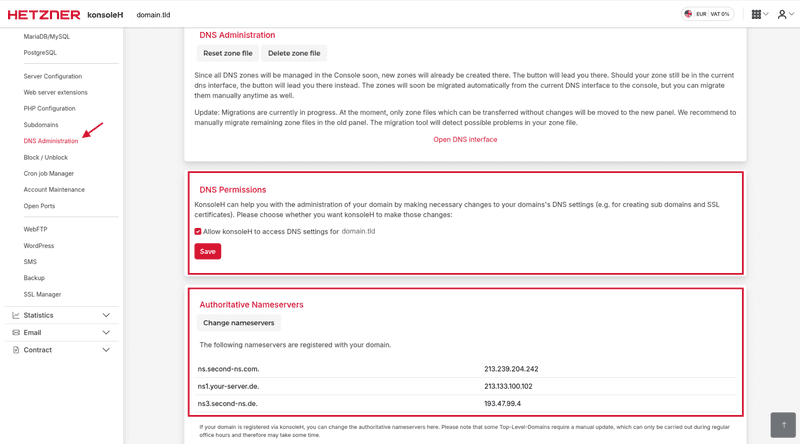
Then, we can use DNSAuth to automatically renew the SSL certificate.
If you currently use other name servers and want to change them you can find our konsoleH name server here
-
You use our hosting server.
- If you are not sure which hosting server you are using, there are several ways to check.
- Check the konsoleH overview to see if the A record of your domain has the same IP address as your hosting server.
- You can also use online tools to find the A record.
- Or, you can use the customized command for your domain on the command line:
dig A domain.tld
- Then, it is still possible to do the authentication via FileAuth.
- Important notes: It is not possible to do wildcard certificates via FileAuth. Additionally, proxy setups (like Cloudflare) may cause problems if they do not redirect the paths correctly.
- If you are not sure which hosting server you are using, there are several ways to check.
Which features will no longer be supported?
Until now, we manually renewed SSL certificates for which the process could not be automated, such as for customers who store DNS or FileAuth themselves. However, the shorter SSL certificate validity periods mean that manually renewing certificates now requires significantly more work. This also applies to you as a customer. Therefore, we will no longer be able to manually renew free certificates (Let's Encrypt and Basic) as of August 1, 2026. We can only renew free certificates if the process can be fully automated. This will be the case if you use our name servers and allow us to edit the zone file, or if you use our hosting server.
Is there a difference between business certificates (like Thawte) and free SSL certificates?
-
For free certificates (like Let's Encrypt or Basic), it is no longer possible to do manual authentications (for example, when the customer needs to provide DNS or FileAuth themselves). We will only renew certificates if we can automate the process.
- I got an email about this from Hetzner. What happens if I do nothing?
- If you take no action, we cannot automatically renew your free SSL certificate, and it will run out. Then people may have difficulty visiting your website.
-
For business certificates, you can continue to purchase "one-year" certificates for the time being. However, at the end of the certificate's initial term (approximately six months), you have to renew the certificate by doing a reissue so you can get the rest of the 12 months. We will send you a mail to remind you to do the reissue.
- If my SSL certificate runs out because I take no action, can I still renew it?
- Unfortunately, no, you cannot. You will need to order a new SSL certificate.
-
You can continue to import SSL certificates from third-party providers into konsoleH. To do so, select the domain, and then select "Services; SSL Manager" from the left-hand menu.
If you have any questions or need assistance, please contact us via a support request. We are happy to help.