How can I manage my certificates?
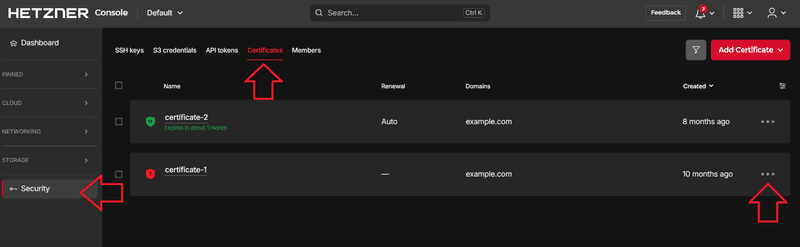
When you setup an HTTPS service for your Load Balancer, you can add a certificate. You can manage your certificates in the Hetzner Console. Simply open your project and go to Security on the left menu bar. Then, go to Certificates on the upper menu bar and select Add Certificate.
You have two options:
-
Create certificate
This will create a Let's Encrypt certificate which will be automatically renewed by Hetzner. For this certificate, the domain name must use Hetzner DNS as the name servers. -
Upload certificate
You can also upload your existing certificate. You will have to monitor its expiration date and handle renewal yourself.
After a certificate has been added, you can use the options dropdown on the right to add labels and rename or delete the certificate.
Should there be an error, you can also use the options dropdown to retry.
If the creation process of a certificate managed by Hetzner fails and the error was fixed, you can use the options dropdown to retry issuing the certificate.
What is a managed certificate?
For websites, a TLS/SSL certificate is used to prove the identity of the hosting server and verify that the communication between the client and the server is encrypted. This helps to protect sensitive information. Let's Encrypt is an organization that issues these TLS/SSL certificates for free. Once a certificate has been issued for a certain domain, the URL will begin with an https, with s being short for secure. Additionally, there will be a green lock right next to the URL.
In Hetzner Console you can add TLS/SSL certificates to your projects. You can either upload an existing certificate, or you can create a new one. If you choose to create a new certificate, a Let's Encrypt certificate will be created and managed for you by Hetzner. This is the managed certificate.
What do I need for a TLS/SSL certificate?
To get a TLS/SSL certificate, you need a domain (example.com), a Domain Name System (DNS) and access to the hosting server.
Certificates managed by us can only be created with a Hetzner DNS zone. You can either use Hetzner DNS directly or you can use an external DNS and delegate ACME challenge to Hetzner DNS.
The Domain Name System (DNS) basically contains a list of domains and the corresponding IP addresses. This information is stored on name servers that are accessible via the internet.
Hetzner DNS
You can create your own Hetzner DNS zones at console.hetzner.com. To create a new zone, you need to already own a domain. The name servers of Hetzner DNS are called:
- hydrogen.ns.hetzner.com
- oxygen.ns.hetzner.com
- helium.ns.hetzner.de
The actual information of the DNS is stored on the name servers (ns). To create a certificate, the DNS has to answer correctly, so the name of the name servers should not be changed.
In order to administer your DNS entries using the Hetzner Console, you will need to point to the Hetzner name servers from your legacy DNS provider. For more information, take a look at our documentation on the DNS
External DNS
If you have an external DNS, you can delegate ACME challenge to Hetzner DNS and use your Hetzner DNS zone to create a certificate that is managed by us. This tutorial about setting up a Let's Encrypt certificate on cloud Load Balancers explains how to create a Hetzner DNS zone and how to redirect an external DNS zone to the Hetzner DNS zone.
How can I add a certificate including the intermediate certificates?
To add a server certificate with all necessary intermediate certificates, combine the certificates. Here is how it works:
-----BEGIN CERTIFICATE-----
(Your Primary SSL certificate)
-----END CERTIFICATE-----
-----BEGIN CERTIFICATE-----
(Your Intermediate certificate(s))
-----END CERTIFICATE-----
You can then paste this combined certificate to the certificate form.